How the Armbian mirror system works
The Armbian mirror system distributes files efficiently, routing each user to the best available server by geographic proximity and server health. This page explains how it works, what a mirror needs to provide, and how to contribute one.
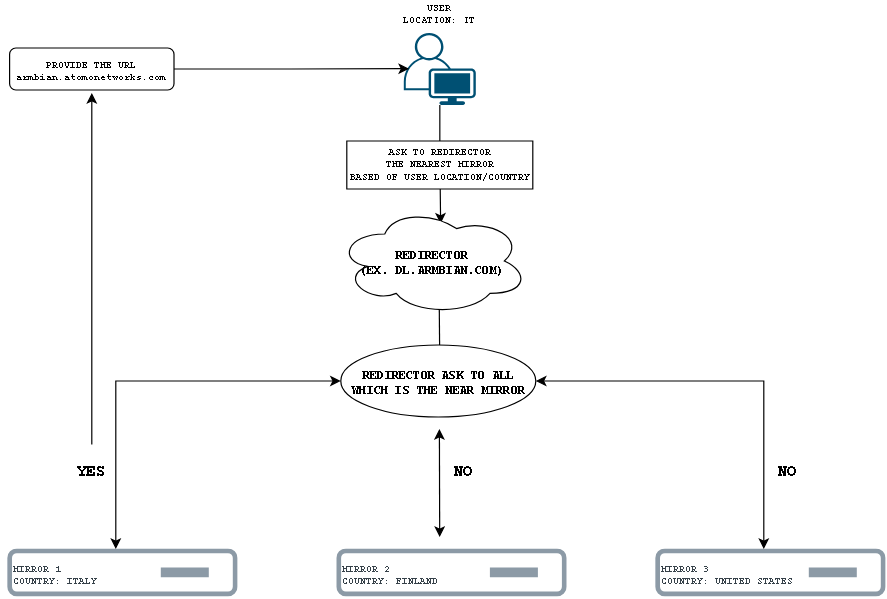
How it works
- Request — a user starts a download (image, package, …) from a standard URL such as
https://dl.armbian.com. - Routing — the redirector picks the best mirror based on the user’s location, each mirror’s status and load, and whether it holds the requested file.
- Redirect — the user is sent straight to the chosen mirror.
- Download — the file is served directly from that mirror, keeping downloads fast and taking load off the core infrastructure.
The result is load balancing across many servers, faster downloads from a nearby mirror, and redundancy — if a mirror is unavailable, the redirector automatically routes around it.
Contribute a mirror
If you can host a mirror for the project, here is how.
1. Set up an HTTP(S) host
The mirror must be reachable over HTTPS (plain HTTP is also accepted). Point a hostname at it before you start syncing.
2. Sync with rsync
Pull the content you want to serve from one of the official modules, and run it from cron every 2-4 hours:
| Content | Command | Required space |
|---|---|---|
| Current images | rsync -av rsync://rsync.armbian.com/dl |
556G |
| Packages | rsync -av rsync://rsync.armbian.com/apt |
84G |
| Archived images | rsync -av rsync://rsync.armbian.com/archive |
1.9T |
| Very old images | rsync -av rsync://rsync.armbian.com/oldarchive |
5.4T |
3. Tell us about it
Once the server is running, reach out through the contact form so we can add it to the official redirector.
Thanks for helping keep Armbian’s downloads fast and reliable worldwide.


