Installing to internal storage
At this stage, nothing has been installed onto the board’s internal drive yet. Using the installer, one can now decide where to install the boot loader and the rest of the system. The installer supports various combinations depending on the availability of onboard eMMC and/or attached SATA, NVME, or USB storage.
Armbian Installer support those storage scenarios:
- boot from SD, system on SATA / USB
- boot from eMMC / NAND, system on eMMC/NAND
- boot from eMMC / NAND, system on SATA / USB / NVME
- Boot from SPI - system on SATA, USB or NVMe
- Install/Update the bootloader on SD/eMMC
- Install/Update the bootloader on special eMMC partition
- Install/Update the bootloader on SPI Flash
- Install system to UEFI disk
Start the install script, make your choice, and follow the instructions:
| Text Only | |
|---|---|
1 | |
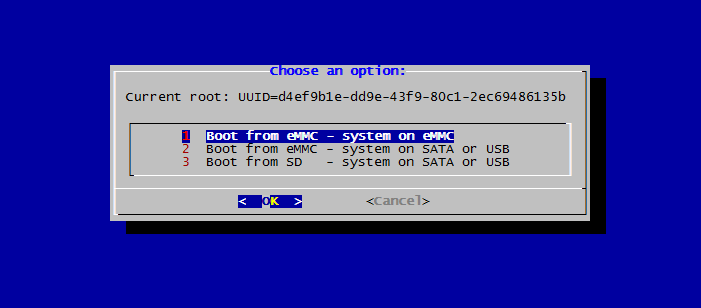
After you have decided for an option, you can choose between the following file systems:
- ext2,3,4
- btrfs
For novice users, a sensible default is ext4.
Congratulation. You have successfully installed Armbian onto your board!
Previous: First steps after login
Next: Keeping Armbian up to date
Back to the Getting Started overview.